
A profile instead of willpower: how AZ-Way Lock keeps focus on iPhone, iPad and Mac
On this page
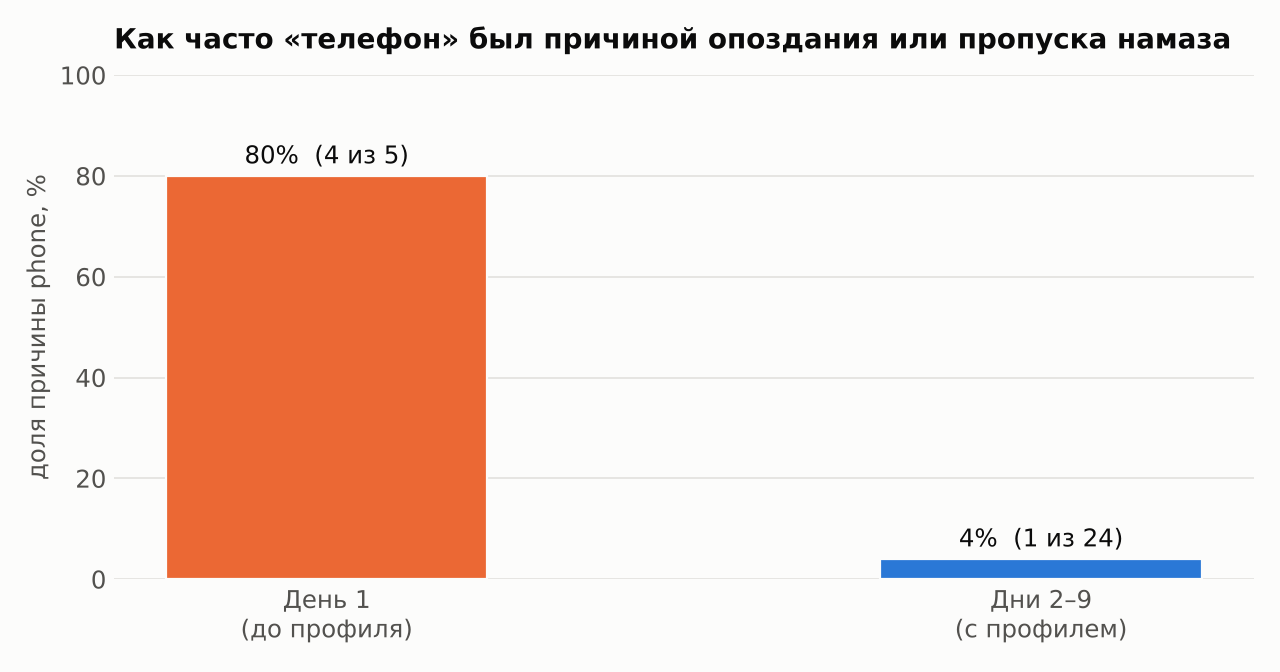
phone reason almost disappeared from az-log: 4 cases out of 5 on the first day and 1 out of 24 over the next eight.Why a profile and not willpower
In the post az-log I described how the very first row of the spreadsheet showed that I had missed or delayed four of five prayers because of my phone. The conclusion wasn’t “try harder” but “change the conditions”.
The logic is simple. I make the decision “open a video or not” dozens of times a day, each time in a moment of tiredness. Lose even one time in ten, and the day is gone. A profile moves that decision to a single point: I made it once, calmly, at the computer, and after that the phone simply doesn’t offer the choice.
It helps to think about it as the cost of access: how many steps and how much time separate me from a distraction.
| Action | Without the profile | With the profile |
|---|---|---|
| Open an entertainment app | 1 tap | impossible: the app is hidden and won’t launch |
| Open the same service in a browser | 2–3 taps | blocked by the web filter |
| Install another browser or a VPN | a couple of minutes in the App Store | forbidden by the profile |
| Find a video through another search engine | 1 query | alternative search engines are blocked |
| Remove the profile | — | only from the Mac that supervises the device |
| Erase the phone and start over | — | forbidden on the device |
The last two rows matter most. As long as the restrictions can be lifted in ten seconds, they aren’t restrictions, they’re reminders.
Architecture: three layers
A profile is an ordinary .mobileconfig file containing several blocks of settings (payloads). I have two versions: one for iPhone and iPad, and a lighter one for Mac.
| Layer | What it does | iPhone / iPad | Mac |
|---|---|---|---|
| DNS filter | all DNS through Cloudflare for Families over DNS-over-HTTPS: blocks malicious and adult sites | ✅ can’t be turned off | — |
| Web filter | a system list of blocked domains, works in the browser and in apps | ✅ 103 domains | ✅ the same 103 |
| Restrictions | blocks apps, Apple services and loopholes | ✅ 68 apps, 20 disabled features | — |
| Removal protection | the profile can’t be removed from the device itself | ✅ | — |
Why the Mac is less protected is explained below, in the section on trade-offs.
What’s inside, in numbers
I don’t publish the specific names: everyone’s list is different, and it goes out of date quickly. The structure matters more. I sorted both lists into categories and separately marked what isn’t content but a road to it.
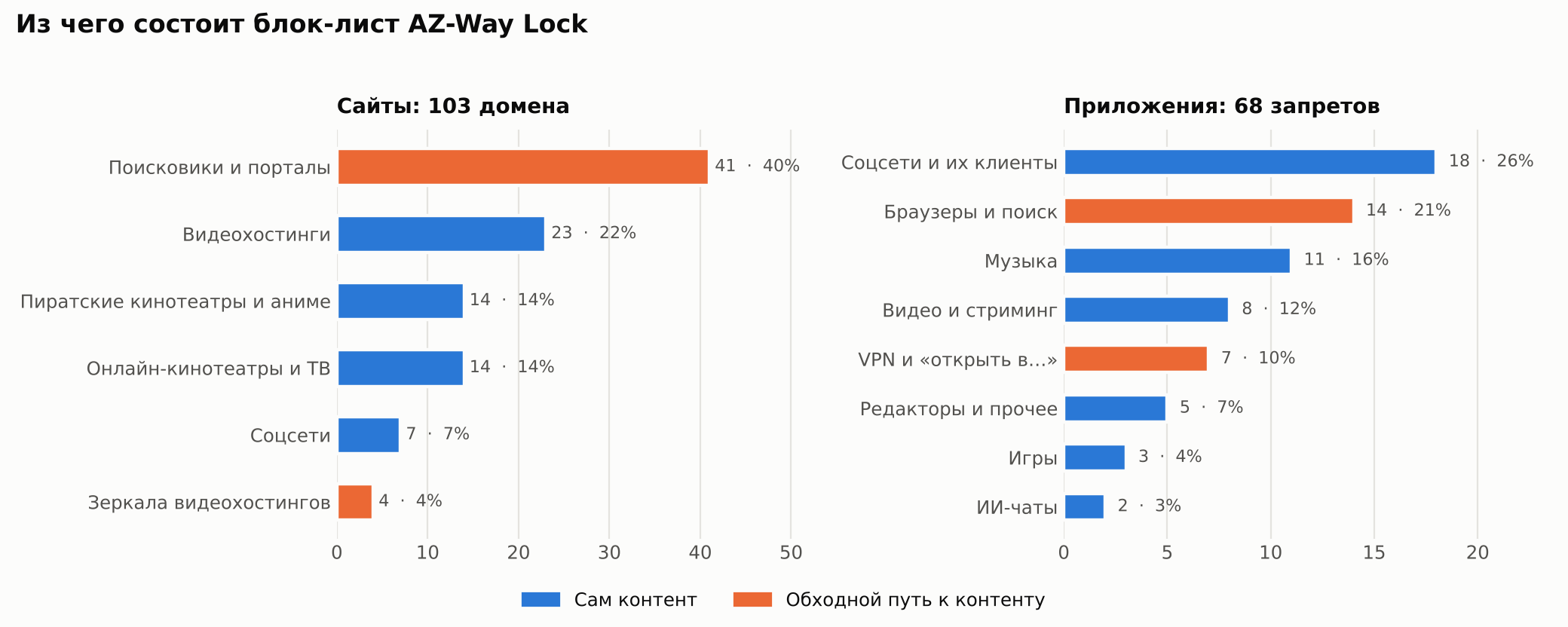
| Total | Content itself | Workarounds | Share of workarounds | |
|---|---|---|---|---|
| Sites | 103 | 58 | 45 | 44 % |
| Apps | 68 | 47 | 21 | 31 % |
What follows from this:
- The largest category of sites is search engines (40 %). Not because search is harmful, but because every search engine has a “Videos” tab that plays clips right in the results. One main search engine for work stays; the rest are blocked.
- Browsers and VPNs are the second-largest block of apps. The iOS web filter works reliably in Safari. Any third-party browser with its own DNS, or a VPN app, bypasses it, so only Safari is allowed.
- A separate item: “open in…” apps. They can hand a link to a built-in browser inside themselves, past the filter. There are several of these on the list.
- The list grows from workarounds, not temptations. The distracting services themselves can be counted on one hand; everything else is ways to reach them.
That’s the main lesson of the whole exercise: blocking popular services is easy. Making sure they can’t be reached by a roundabout way is where the real work is — and almost half the list.
Twenty disabled features
Of the 91 settings in the restrictions block, I disabled 20. By purpose they fall into three groups:
| Group | Count | Examples |
|---|---|---|
| Protecting the profile itself | 6 | no installing other profiles, creating a VPN, erasing the device, connecting to a new computer |
| Apple’s built-in entertainment | 8 | Music, Podcasts, News, iTunes Store, Game Center, radio |
| Quiet loopholes | 6 | internet results in Spotlight, Private Relay, Siri, automatic app downloads |
The first group is the smallest and the most important. Without it, everything else can be undone in a minute.
Why everything is softer on the Mac
The macOS version has only one layer — the same list of 103 domains — and it can be removed. That’s a deliberate trade-off, not an oversight.
- The Mac is a work tool. It has the terminal, browsers for development and documentation. A hard app ban there would get in the way more than it would help.
- The Mac is the key. It’s the machine that put the iPhone and iPad into supervised mode, and the only one that can remove their profile. Lock the key itself, and fixing mistakes in the profile becomes awkward.
- The place is different. At the Mac I sit at a desk and work. The phone lies next to the bed and is always in my pocket. The risk is different, so the protection is different.
Trade-offs and holes
An honest list of what the profile does not solve:
- Supervision requires erasing the device. Most restrictions only work on a supervised iPhone or iPad, and putting it into that mode through Apple Configurator is only possible with a reset followed by restoring from a backup.
- A block list is a race. A new mirror site or a new app appears faster than I find it. An allow list (only what’s listed is permitted) would be more reliable, but it’s impossible to work normally with one.
- The Mac stays open. If you want it badly enough, there’s a way around. The profile on the Mac is a fence, not a wall.
- A profile doesn’t create a habit. It removes the worst option but doesn’t make you do the best one. The time it frees up still has to be filled with something deliberately.
What az-log showed
I check everything with the same spreadsheet. For every prayer that was prayed late or missed, the _why column holds a reason from a short list. I compared the share of the phone reason on the first day, before the profile, and over the following eight days.
| Period | Entries with a reason | Of them phone | Share |
|---|---|---|---|
| Day 1 | 5 | 4 | 80 % |
| Days 2–9 | 24 | 1 | 4 % |
How to read this without fooling yourself:
- The sample is tiny. One day against eight is an observation, not proof. In a month the numbers will be more honest.
- The reason shifted rather than vanished.
work,otherandsleepmoved to the front. The profile removed one problem and revealed the next ones. That’s expected, and even useful. - I assign the reason myself. There may be a bias towards what I want to see. That’s why the list of reasons is closed and short, and free text is forbidden.
If you want to repeat it
The general scheme, without tying it to my lists:
- Data first. For a week, write down what goes wrong and why. Without that you won’t know what to block.
- Apple Configurator on a Mac. Put the iPhone or iPad into supervised mode (the device will be erased, make a backup).
- Build the profile from three layers: DNS filter, web filter with a list of domains, app restrictions.
- Close the workarounds: other browsers, VPNs, installing profiles, resetting the device.
- Forbid removing the profile and install it on the device.
- Keep measuring. If the numbers haven’t changed, the profile is blocking the wrong things.
What’s next
At the end of November I’ll count the share of phone over a month of data and compare it with the first week. If it stays near zero, the next target is work: that’s no longer a question about the phone, but about how the workday is structured.